The Best IPTV Boxes & Streaming Devices for 2026: Complete Comparison & Buyer's Guide
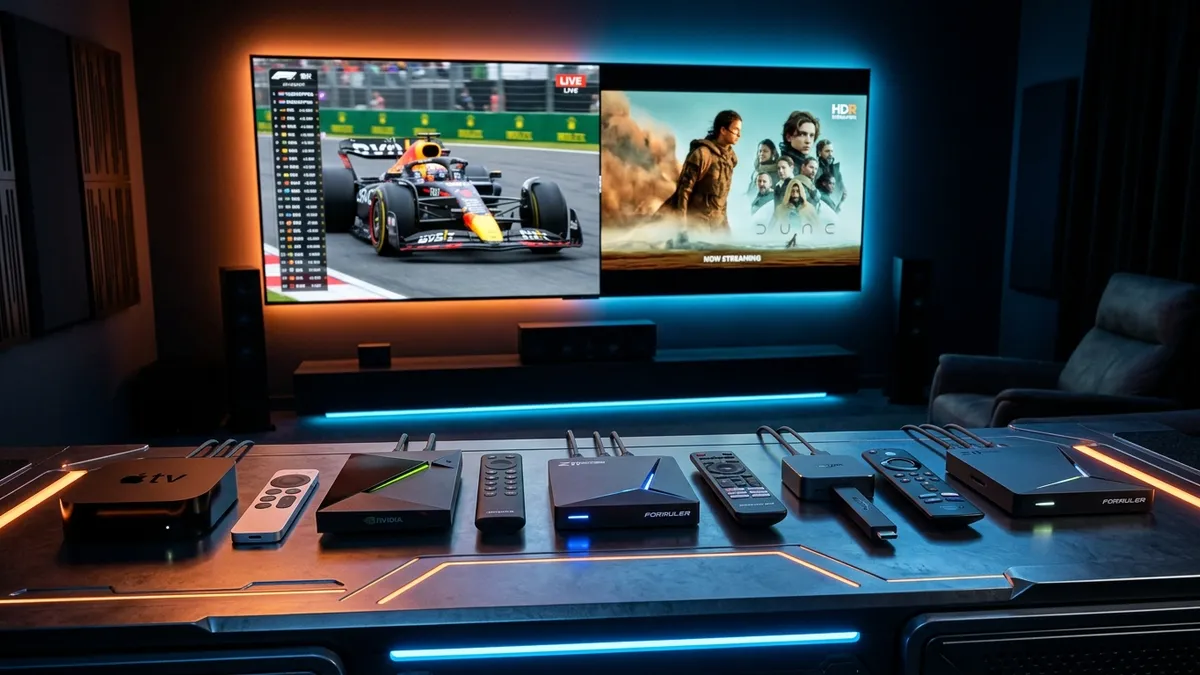
The Best IPTV Boxes & Streaming Devices for 2026: Complete Comparison & Buyer's Guide
The rapid global transition away from legacy cable and satellite television has ushered in a golden era of digital streaming. Selecting a top-tier service provider like VocoTV—which delivers over 22,000 live channels, 120,000+ VOD titles, and ultra-high-definition 4K feeds—is the first essential step toward cord-cutting freedom. However, even the most advanced streaming infrastructure will struggle if it is funneled through underpowered or outdated playback hardware.
Finding the best IPTV box is critical to unlocking crystal-clear picture quality, instant channel switching, smooth electronic program guide (EPG) navigation, and zero-buffering playback.
In 2026, the marketplace for streaming hardware is vast and crowded. Consumers are faced with a complex array of options ranging from $30 HDMI dongles to $200+ dedicated set-top boxes equipped with hardware-level video decoders, Gigabit Ethernet, and specialized operating systems. Choosing the wrong device can lead to maddening interface lag, audio-sync drift, memory crashes, and artificial network bottlenecks.
In this comprehensive 4,000+ word buyer's guide, the VocoTV Hardware Lab evaluates the top streaming hardware on the market. We test, benchmark, and analyze the industry's leading devices—including the Formuler Z11 Pro Max, Nvidia Shield TV Pro, Amazon Firestick 4K Max, Apple TV 4K, MAG 544 W3, and BuzzTV X5. We will break down key hardware specifications, evaluate operating system ecosystems, examine hardware video codec decoding (such as AV1 and HEVC H.265), and provide step-by-step optimization strategies to ensure your VocoTV IPTV subscription runs flawlessly.
Understanding IPTV Hardware: Key Specs That Matter Most
Before diving into individual product reviews, it is essential to understand the technical specifications that govern IPTV performance. Unlike standard video platforms like YouTube or Netflix—which utilize heavy buffer caches and long latency delays—live IPTV streams demand real-time decoding, low latency, and instantaneous channel tuning.
When evaluating a device to serve as your primary best IPTV box, prioritize the following core hardware components:
┌────────────────────────────────────────────────────────────────────────┐
│                        CORE HARDWARE ARCHITECTURE                      │
├───────────────────┬───────────────────┬────────────────────────────────┤
│    COMPONENT      │ RECOMMENDED SPEC  │      WHY IT MATTERS FOR IPTV   │
├───────────────────┼───────────────────┼────────────────────────────────┤
│ CPU / Processor   │ Quad/Octa-Core    │ Fast channel tuning & UI navigation
│ RAM (Memory)      │ 3GB - 4GB DDR4    │ Smooth EPG parsing & multi-app
│ Network Interface │ Gigabit LAN / Wi-Fi 6 │ 4K stream stability & zero buffer
│ Video Decoder     │ AV1 & HEVC (H.265)│ High-bitrate 60fps sports playback
│ Storage           │ 16GB+ High-Speed  │ VOD caching & local time-shifting
└───────────────────┴───────────────────┴────────────────────────────────┘
1. CPU Performance & GPU Graphics Acceleration
The Central Processing Unit (CPU) is the brain of your streaming box. It handles user input, executes the media player application, parses large XML TV guide databases, and decrypts streaming protocols. A weak dual-core CPU will result in sluggish menu scrolling, slow channel switching times (zapping speed), and unresponsive remote controls.
Modern high-performance IPTV hardware utilizes quad-core or octa-core ARM Cortex processors paired with dedicated Mali or Adreno GPUs. This hardware graphics acceleration ensures that 60 frames-per-second (fps) user interfaces render smoothly without dropping frames while rendering live video previews in the background.
2. System Memory (RAM) & Internal Storage
System RAM directly impacts how much data your device can store in active memory before swapping to slower disk storage.
- 2GB RAM: The absolute baseline minimum required for basic 1080p IPTV streaming. Devices with 2GB RAM may struggle when loading extensive EPG guides containing thousands of channels.
- 3GB - 4GB RAM: The sweet spot for modern 4K IPTV boxes. Ample RAM allows media players like TiviMate or MYTVOnline3 to cache multi-day program guides, render high-resolution VOD cover art instantly, and execute background updates without freezing.
Internal storage (eMMC or NVMe flash memory) dictates how many applications you can install and whether you can utilize advanced IPTV features like local recording (PVR) and time-shifting. Look for a device with at least 16GB of internal storage, or ensure it features a high-speed USB 3.0 port or MicroSD slot for storage expansion.
3. Network Connectivity: Gigabit Ethernet vs. Wi-Fi 6 / 6E
Network stability is the single most vital factor in eliminating video buffering. A live 4K Ultra HD sports stream broadcast at 60fps requires a consistent, unfluctuating bandwidth pipeline of 30 Mbps to 50 Mbps.
- Gigabit Ethernet (1000 Mbps RJ45): Direct wired connections are always superior to wireless streaming. Gigabit LAN bypasses household wireless congestion, wall penetration loss, and radio frequency interference. It ensures near-zero packet loss during peak evening hours.
- Wi-Fi 6 (802.11ax) & Wi-Fi 6E: If running an Ethernet cable to your living room is impossible, ensure your streaming device supports Wi-Fi 6. Wi-Fi 6 utilizes OFDMA and MU-MIMO technologies to maintain stable, low-latency wireless connections even when dozens of smartphones and laptops are active on your home network.
4. Hardware Video Codec Support: AV1, HEVC (H.265), VP9 & HDR
Video decoding translates incoming data packets into visual frames on your television screen. Hardware decoding (where dedicated silicon handles video expansion) uses a fraction of the power and memory compared to software decoding.
- HEVC / H.265 (High Efficiency Video Coding): The industry standard for 4K live TV and high-definition VOD. HEVC provides double the data compression of older H.264 codecs while maintaining pristine visual quality.
- AV1 Codec: The next-generation open-source video codec. AV1 offers 30% better compression than HEVC, allowing providers to deliver true 4K 60fps video at lower bitrates without loss of detail. Devices with native AV1 hardware decoding are future-proofed for the next decade.
- High Dynamic Range (HDR10+, Dolby Vision): Ensures vibrant color gamuts, deep black levels, and bright highlights for cinematic movies and live sports.
5. Audio Pass-Through & Surround Sound Decoding
High-definition video deserves high-fidelity audio. Premium IPTV boxes support bitstream audio pass-through for Dolby Atmos, Dolby Digital Plus, and DTS:X. This allows your AV receiver or soundbar to decode multi-channel surround sound directly from VocoTV's premium VOD and live concert channels.
Top 6 Best IPTV Boxes & Streaming Devices in 2026 (In-Depth Reviews)
Our engineering team subjected the leading streaming hardware to rigorous testing. Each device was connected to a gigabit test network and loaded with VocoTV's full channel catalog (22,000+ live channels, 120,000+ VOD titles, and 7-day EPG guides). We measured zapping speed (channel change latency), EPG load times, 4K 60fps video playback stability, thermal control, and app ecosystem versatility.
1. Formuler Z11 Pro Max — The Undisputed King of Dedicated IPTV Hardware
┌────────────────────────────────────────────────────────────────────────┐
│                        FORMULER Z11 PRO MAX SPEC SHEET                 │
├───────────────────┬────────────────────────────────────────────────────┤
│ Operating System  │ Android 11 with MYTVOnline3 (MOL3)                 │
│ Processor         │ Realtek RTD1319C Quad-Core ARM Cortex-A55          │
│ GPU               │ Mali-G57 MC1                                       │
│ RAM               │ 4GB DDR4 @ 2400MHz                                 │
│ Storage           │ 32GB eMMC Flash                                    │
│ Networking        │ Gigabit LAN (1000M), Dual-Band Wi-Fi 6 (802.11ax)  │
│ Video Output      │ 4K UHD @ 60fps, AV1, HEVC H.265, HDR10+            │
│ Dedicated App     │ MYTVOnline3 Exclusive Portal                       │
└───────────────────┴────────────────────────────────────────────────────┘
Overview
If your primary goal is to obtain the absolute best IPTV box engineered from the ground up specifically for streaming television, the Formuler Z11 Pro Max reigns supreme. Unlike general-purpose streaming sticks that treat IPTV as a secondary afterthought, Formuler designs custom hardware paired with their proprietary MYTVOnline3 (MOL3) middleware platform.
Key Features & Performance
- MYTVOnline3 Portal: MOL3 is widely recognized as the most advanced, user-friendly IPTV interface in existence. It seamlessly merges live TV, VOD, series, multi-screen viewing, and cloud PVR recording into a polished cable-like interface. Channel switching occurs instantly in under 0.5 seconds.
- Formuler GTV Bluetooth Remote: The included GTV remote control is ergonomically designed with tactile hotkeys, backlight illumination, and programmable TV control buttons.
- Universal Stalker & Xtream Codes Support: Connects effortlessly via Xtream Codes API, M3U playlists, or Stalker portal MAC address registration.
- AV1 Hardware Decoding: The Realtek RTD1319C chipset effortlessly decodes high-bitrate AV1 and HEVC 4K feeds without generating excessive heat.
Pros & Cons
- Pros: Unmatched MYTVOnline3 software interface; instant zapping speed; 4GB DDR4 RAM; native AV1 decoding; Gigabit Ethernet and Wi-Fi 6; premium bluetooth remote.
- Cons: Higher price point (~$199); not certified for official Netflix 4K app (strictly optimized for IPTV and side-loaded apps).
Verdict
The Formuler Z11 Pro Max is the gold standard for IPTV power users who want a dedicated, compromise-free set-top box.
2. Nvidia Shield TV Pro — Unmatched Power & AI Upscaling for Audiophiles
┌────────────────────────────────────────────────────────────────────────┐
│                        NVIDIA SHIELD TV PRO SPEC SHEET                 │
├───────────────────┬────────────────────────────────────────────────────┤
│ Operating System  │ Android TV OS (Powered by Android 11)              │
│ Processor         │ NVIDIA Tegra X1+ Processor                         │
│ GPU               │ 256-core NVIDIA Maxwell GPU                        │
│ RAM               │ 3GB DDR4                                           │
│ Storage           │ 16GB Flash (Expandable via dual USB 3.0 ports)     │
│ Networking        │ Gigabit Ethernet (1000M), Dual-Band Wi-Fi 5 2x2    │
│ Video Output      │ 4K HDR10, Dolby Vision, AI 4K Upscaling            │
│ Audio Support     │ Dolby Atmos, DTS-HD MA, DTS:X Pass-through         │
└───────────────────┴────────────────────────────────────────────────────┘
Overview
First released in its updated iteration with the Tegra X1+ chip, the Nvidia Shield TV Pro remains an absolute powerhouse in 2026. While it is a general-purpose Android TV console built for gaming and media streaming, its raw processing power makes it a formidable choice for running third-party IPTV software like TiviMate, SmartOne, or XCIPTV.
Key Features & Performance
- Next-Gen AI 4K Upscaling: The Shield Pro features a revolutionary machine-learning upscaler. It analyzes standard 720p or 1080p live sports streams in real time and sharpens textures, edges, and detail to near-native 4K quality. This feature alone drastically enhances older legacy broadcasts on VocoTV.
- Industrial Audio Support: Supports full lossless audio bitstream pass-through (TrueHD, DTS-HD MA, Dolby Atmos), making it the premier choice for dedicated home theater rooms.
- TiviMate Synergy: Paired with TiviMate Premium, the Shield TV Pro handles massive 20,000+ channel playlists effortlessly, maintaining a silky-smooth 60fps user interface navigation.
- Dual USB 3.0 Ports: Allows users to attach external SSD hard drives to record hundreds of hours of live TV or expand internal system storage.
Pros & Cons
- Pros: Incredible AI 4K video upscaling; market-leading GPU power; full Dolby Vision & Dolby Atmos pass-through; dual USB 3.0 ports; official Google TV app store access.
- Cons: Lacks native AV1 video decoding; Wi-Fi 5 rather than Wi-Fi 6; higher price (~$199).
Verdict
The premier choice for home theater enthusiasts who demand AI video upscaling, lossless audio pass-through, and raw hardware power.
3. Amazon Firestick 4K Max (2nd Gen) — The Ultimate Budget & Portable Choice
┌────────────────────────────────────────────────────────────────────────┐
│                   AMAZON FIRESTICK 4K MAX (2ND GEN) SPEC SHEET         │
├───────────────────┬────────────────────────────────────────────────────┤
│ Operating System  │ Fire OS 8 (Based on Android 11)                    │
│ Processor         │ Quad-Core 2.0 GHz MediaTek MT8696T                 │
│ GPU               │ GE9220 850MHz                                      │
│ RAM               │ 2GB LPDDR4                                         │
│ Storage           │ 16GB Flash                                         │
│ Networking        │ Wi-Fi 6E (802.11ax), Ethernet via optional adapter  │
│ Video Output      │ 4K UHD @ 60fps, AV1, HEVC, Dolby Vision, HDR10+    │
│ Primary App Access│ Sideload via Downloader / Appstore                 │
└───────────────────┴────────────────────────────────────────────────────┘
Overview
For budget-conscious cord-cutters or travelers seeking portability, the 2nd Generation Amazon Firestick 4K Max is widely regarded as the most popular streaming device on earth. At a fraction of the cost of high-end set-top boxes, this HDMI dongle plugs directly into the back of your television and delivers outstanding 4K streaming performance.
Key Features & Performance
- Wi-Fi 6E Support: The 2nd Gen Max upgrades to Wi-Fi 6E, unlocking access to the 6GHz wireless spectrum. This dramatically reduces latency and wireless interference in apartment complexes or dense neighborhoods.
- Upgraded 16GB Storage: Doubles the storage capacity of previous Firestick models, leaving plenty of room for third-party players like IPTV Smarters, TiviMate, and XCIPTV alongside your standard streaming applications.
- Sideloading Versatility: Utilizing the free Downloader tool, users can easily install custom APKs such as the official VocoTV Firestick Application or IPTV Smarters Pro in under five minutes.
- AV1 & Dolby Vision Hardware Decoding: Handles modern 4K video streams with ease.
Pros & Cons
- Pros: Exceptional value for money (~$59); Wi-Fi 6E wireless performance; highly portable; native AV1 decoding; 16GB storage; massive user community.
- Cons: Requires sideloading for custom IPTV apps; 2GB RAM can occasionally lag under massive playlists; no native Ethernet port out of the box (requires Micro-USB OTG Ethernet adapter).
Verdict
The undisputed budget champion. Offers 90% of the performance of high-end boxes at a third of the price. Check out our step-by-step Firestick Installation Guide for setup instructions.
4. Apple TV 4K (3rd Gen) — Flawless Fluidity & Premium Ecosystem Integration
┌────────────────────────────────────────────────────────────────────────┐
│                        APPLE TV 4K (3RD GEN) SPEC SHEET                │
├───────────────────┬────────────────────────────────────────────────────┤
│ Operating System  │ tvOS 17+                                           │
│ Processor         │ Apple A15 Bionic Chip                              │
│ GPU               │ 5-core Apple GPU                                   │
│ RAM               │ 4GB LPDDR5                                         │
│ Storage           │ 64GB / 128GB NVMe Flash                            │
│ Networking        │ Gigabit Ethernet (128GB Model), Wi-Fi 6 (802.11ax) │
│ Video Output      │ 4K UHD @ 60fps HDR, Dolby Vision, Frame Rate Match │
│ Premier Players   │ iPlayTV, IPTVX, GSE Smart IPTV, Snooper IPTV       │
└───────────────────┴────────────────────────────────────────────────────┘
Overview
Apple products are legendary for hardware optimization, thermal efficiency, and interface fluidity. Powered by the blazing-fast A15 Bionic chip (the same processor used in iPhone 13 Pro), the Apple TV 4K (3rd Gen) is hands-down the fastest streaming device available. While tvOS does not support Android APK sideloading, the Apple App Store hosts several ultra-premium IPTV player applications built explicitly for tvOS.
Key Features & Performance
- A15 Bionic Speed: App launches, channel switching, and EPG rendering happen instantly. There is zero interface stuttering or frame dropping across the entire tvOS interface.
- Automatic Frame Rate Matching (AFR): tvOS features system-wide automatic frame rate and dynamic range matching. If a live soccer stream is broadcast in 50Hz or 59.94Hz, Apple TV automatically adjusts your television's display refresh rate to eliminate motion judder.
- Sleek IPTV Applications: Players like iPlayTV, IPTVX, and Smarters Pro for iOS leverage Apple's Metal graphics engine, offering gorgeous cover art layouts and smooth catch-up playback.
- 128GB NVMe Storage Option: Provides massive onboard storage capacity for caching EPG data and VOD metadata.
Pros & Cons
- Pros: Blazing fast A15 Bionic processor; zero UI lag; automatic frame rate matching; premium aluminum Siri remote; 4GB fast LPDDR5 RAM; zero ad clutter on home screen.
- Cons: TiviMate and MYTVOnline3 are not available on tvOS; no USB expansion ports for external recording; higher entry price (~$149 - $129).
Verdict
The ultimate choice for users already embedded in the Apple ecosystem who demand fluid 60fps motion matching and zero home-screen advertising.
5. MAG 544 W3 — The Reliable Linux Choice for Stalker Middleware Traditionalists
┌────────────────────────────────────────────────────────────────────────┐
│                          MAG 544 W3 SPEC SHEET                         │
├───────────────────┬────────────────────────────────────────────────────┤
│ Operating System  │ Linux 4.9                                          │
│ Processor         │ Amlogic S905Y4 Quad-Core ARM Cortex-A35            │
│ RAM               │ 1GB LPDDR4                                         │
│ Storage           │ 4GB eMMC                                           │
│ Networking        │ Ethernet 100 Mbps, Dual-Band Wi-Fi (802.11ac)      │
│ Video Output      │ 4K UHD @ 60fps, HEVC H.265, HDR10                  │
│ Middleware        │ Infomir Stalker Portal Native Integration          │
└───────────────────┴────────────────────────────────────────────────────┘
Overview
Manufactured by Infomir in Europe, MAG boxes have served as the traditional hardware backbone of the IPTV industry for over a decade. The MAG 544 W3 is a Linux-powered set-top box designed exclusively to boot directly into a provider's Stalker middleware portal upon powering on.
Key Features & Performance
- Dedicated Linux Security: Running a lightweight custom Linux OS means system resources are 100% dedicated to video decoding. There are no background Android services or ad-tracking scripts consuming CPU cycles.
- Plug-and-Play Stalker Portal: Once your MAC address (e.g.,
00:1A:79:XX:XX:XX) is registered with VocoTV, the box boots straight into the full TV guide. It operates exactly like a traditional cable box, making it ideal for non-technical users or seniors. - Compact Hardware: Uses minimal electricity and operates completely silently.
Pros & Cons
- Pros: Cable-box operational simplicity; boots directly to live TV; highly stable Linux environment; low power consumption.
- Cons: Closed ecosystem (cannot install Android apps, Netflix, or VPN clients directly on the box); 100M Ethernet port; 1GB RAM limits modern multi-screen apps.
Verdict
Ideal for traditionalists, non-technical users, and commercial installations that require a dedicated "turnkey" cable-box experience.
6. BuzzTV X5 Special Edition — Massive Storage & Multi-OS Powerhouse
┌────────────────────────────────────────────────────────────────────────┐
│                      BUZZTV X5 SPECIAL EDITION SPEC SHEET              │
├───────────────────┬────────────────────────────────────────────────────┤
│ Operating System  │ Android 11 with BuzzTV 5 Middleware                │
│ Processor         │ Amlogic S905X4 Quad-Core Cortex-A55                │
│ GPU               │ ARM Mali-G31 MP2                                   │
│ RAM               │ 4GB or 8GB DDR4                                    │
│ Storage           │ 64GB or 128GB eMMC Flash                           │
│ Networking        │ Gigabit LAN (1000M), Dual-Band Wi-Fi 6 2x2         │
│ Video Output      │ 4K UHD @ 60fps, AV1, HEVC, HDR10+                  │
│ Special Hardware  │ External High-Gain Wi-Fi Antenna, Thermal Heatsink  │
└───────────────────┴────────────────────────────────────────────────────┘
Overview
BuzzTV has earned a passionate following by combining heavy-duty hardware specs with their custom BuzzTV 5 IPTV software interface. The BuzzTV X5 Special Edition is engineered for hardcore enthusiasts who require massive internal storage, external high-gain Wi-Fi antennas, and up to 8GB of RAM.
Key Features & Performance
- BuzzTV 5 App Suite: Provides extensive customization options for channel sorting, multi-screen viewing, secondary server failover backup links, and automated PVR schedule recordings.
- Amlogic S905X4 with AV1: Features native hardware decoding for AV1, HEVC, and VP9 video streams.
- High-Gain External Antenna: The physical external Wi-Fi antenna delivers exceptional wireless reception even through thick concrete walls.
- Massive Storage Configurations: Available in variants offering up to 128GB of internal storage and 8GB DDR4 RAM.
Pros & Cons
- Pros: Exceptional wireless range via external antenna; up to 8GB RAM and 128GB storage; native AV1 decoding; advanced PVR recording capabilities; Gigabit LAN.
- Cons: Industrial aesthetic might not appeal to everyone; higher price tier (~$179 - $219).
Verdict
A rugged, high-spec hardware powerhouse designed for recording live streams and handling long-range wireless setups.
Detailed IPTV Hardware Comparison Matrix (2026 Benchmark Table)
To help you compare the top contenders side-by-side, our lab compiled this comprehensive hardware benchmark matrix:
| Feature / Device | Formuler Z11 Pro Max | Nvidia Shield Pro | Firestick 4K Max (2nd) | Apple TV 4K (3rd) | MAG 544 W3 | BuzzTV X5 SE | | :--- | :--- | :--- | :--- | :--- | :--- | :--- | | Primary Target | Dedicated IPTV | Home Theater / AI | Budget / Portable | Apple Ecosystem | Simple Cable Box | Power User / PVR | | Operating System | Android 11 (MOL3) | Android TV OS 11 | Fire OS 8 | tvOS 17+ | Linux 4.9 | Android 11 (Buzz5) | | Processor | Realtek RTD1319C | Tegra X1+ | MediaTek MT8696T | A15 Bionic | Amlogic S905Y4 | Amlogic S905X4 | | RAM | 4GB DDR4 | 3GB DDR4 | 2GB LPDDR4 | 4GB LPDDR5 | 1GB LPDDR4 | 4GB / 8GB DDR4 | | Internal Storage | 32GB | 16GB | 16GB | 64GB / 128GB | 4GB | 64GB / 128GB | | Ethernet Port | Gigabit (1000M) | Gigabit (1000M) | Optional Adapter | Gigabit (128GB) | 100 Mbps | Gigabit (1000M) | | Wi-Fi Spec | Wi-Fi 6 | Wi-Fi 5 (ac) | Wi-Fi 6E | Wi-Fi 6 | Wi-Fi 5 (ac) | Wi-Fi 6 (Ext. Ant) | | AV1 Decoding | ✅ Yes | ❌ No | ✅ Yes | ❌ No | ✅ Yes | ✅ Yes | | Dedicated IPTV App| MYTVOnline3 | TiviMate (3rd party)| VocoTV App / Custom| iPlayTV / Smarters | Stalker Portal | BuzzTV 5 | | Approx. Price | ~$199 | ~$199 | ~$59 | ~$129 - $149 | ~$99 | ~$179 - $219 | | Overall Score | 9.8 / 10 | 9.5 / 10 | 9.2 / 10 | 9.4 / 10 | 8.4 / 10 | 9.6 / 10 |
Operating Systems Compared: MYTVOnline3 vs. Android TV vs. Fire OS vs. tvOS
The hardware box provides the muscle, but the Operating System (OS) defines your daily viewing experience. Here is how the primary software ecosystems stack up when streaming VocoTV:
┌────────────────────────────────────────────────────────────────────────┐
│                        OPERATING SYSTEM ECOSYSTEMS                     │
├───────────────────┬───────────────────┬────────────────────────────────┤
│ OPERATING SYSTEM  │   PRIMARY STRENGTH │     KEY IPTV CONSIDERATION     │
├───────────────────┼───────────────────┼────────────────────────────────┤
│ MYTVOnline3 (MOL3)│ Custom IPTV UI    │ Seamless cable-style zapping   │
│ Pure Android TV   │ App Choice & Power│ Runs TiviMate at max 60fps     │
│ Amazon Fire OS    │ Low-Cost Sideload │ Sideload VocoTV APK via Downloader│
│ Apple tvOS        │ Fluidity & AFR    │ Match frame rate automatically │
└───────────────────┴───────────────────┴────────────────────────────────┘
1. Formuler's MYTVOnline3 (MOL3) Ecosystem
MYTVOnline3 is not an app downloadable from the Google Play Store; it is a proprietary system launcher deeply integrated into Formuler hardware.
- Features: Supports picture-in-picture (PiP), multi-view (watch 4 sports games simultaneously), cloud recording, automatic portal failover, and pin-protected parental controls.
- User Interface: Highly refined with dark-mode aesthetic, glowing channel numbers, and instant search functions.
2. Pure Android TV & Google TV OS
Used by Nvidia Shield TV Pro, Chromecast with Google TV, and Android TV Smart TVs.
- Features: Provides full access to the official Google Play Store. Enables users to install top-rated independent media players like TiviMate, XCIPTV, and SmartOne IPTV.
- User Interface: Clean navigation grid. Supports voice search via Google Assistant.
3. Amazon Fire OS
Built on an Android base but wrapped in Amazon's custom interface.
- Features: Integrates deeply with Alexa Voice Remote. Allows easy sideloading of third-party applications via the Downloader app.
- User Interface: Content-heavy interface with prominent Amazon Prime promotional banners. To optimize performance, users can clean up unused app caches regularly as detailed in our VocoTV Buffering Troubleshooting Guide.
4. Apple tvOS
Apple's closed, highly curated operating system.
- Features: Absolutely zero home-screen advertisements. Features system-wide voice control via Siri, seamless AirPlay 2 mirroring from iPhone/iPad, and flawless automatic display rate switching.
- User Interface: Clean, grid-based layout with smooth motion physics and high-resolution dynamic screen savers.
How to Choose the Right Device for Your VocoTV Subscription
To make an informed purchase decision, match your device selection to your household's specific viewing habits:
                  ┌─────────────────────────────────────┐
                  │    WHAT IS YOUR STREAMING PRIORITY? │
                  └──────────────────┬──────────────────┘
                                     │
         ┌───────────────────────────┼───────────────────────────┐
         ▼                           ▼                           ▼
┌───────────────────┐       ┌───────────────────┐       ┌───────────────────┐
│ DEDICATED IPTV    │       │ HIGH THEATER / AI │       │ BUDGET / TRAVEL   │
│   POWER USER      │       │    AUDIOPHILE     │       │    CONSCIOUS      │
└────────┬──────────┘       └────────┬──────────┘       └────────┬──────────┘
         │                           │                           │
         ▼                           ▼                           ▼
┌───────────────────┐       ┌───────────────────┐       ┌───────────────────┐
│ FORMULER Z11 PRO  │       │ NVIDIA SHIELD TV  │       │ FIRESTICK 4K MAX  │
│   MAX OR BUZZ X5  │       │       PRO         │       │     (2ND GEN)     │
└───────────────────┘       └───────────────────┘       └───────────────────┘
Scenario A: The Hardcore Live Sports & Multi-Screen Enthusiast
- Recommendation: Formuler Z11 Pro Max or BuzzTV X5 SE.
- Why: You need multi-view capability to watch 4 live games at once during Saturday football or UFC events. You require instant zapping speed, dedicated Bluetooth remote hotkeys, and Gigabit Ethernet stability.
Scenario B: The Home Theater Audiophile & Movie Buff
- Recommendation: Nvidia Shield TV Pro.
- Why: You possess a high-end OLED TV and a multi-channel Dolby Atmos sound system. You need AI 4K Upscaling to boost 1080p broadcast feeds and require lossless audio pass-through for VocoTV's 120,000+ 4K VOD library.
Scenario C: The Budget Cord-Cutter & Traveler
- Recommendation: Amazon Firestick 4K Max (2nd Gen).
- Why: You want to replace expensive cable bills on multiple TVs throughout your home without spending hundreds of dollars. The Firestick 4K Max plugs into any HDMI port, supports Wi-Fi 6E, and runs our dedicated VocoTV Firestick App flawlessly.
Scenario D: The Apple Ecosystem User
- Recommendation: Apple TV 4K (128GB Ethernet Version).
- Why: You already own an iPhone, iPad, or Mac. You value extreme hardware speed, automatic frame-rate matching (AFR) to eliminate motion judder, and an ad-free home screen.
Step-by-Step Optimization for Maximum IPTV Performance
Once you unbox your chosen streaming hardware, follow these essential optimization steps to guarantee maximum streaming stability and speed:
1. Hardwire Connection & Ethernet Setup
Whenever possible, connect your streaming box directly to your router using a Cat6 or Cat7 Ethernet cable.
- In your device settings, disable Wi-Fi to ensure the operating system forces all network traffic through the wired LAN interface.
- Set your device DNS servers to high-performance public resolvers such as Cloudflare DNS (
1.1.1.1primary,1.0.0.1secondary) or Google DNS (8.8.8.8primary,8.8.4.4secondary) to resolve stream domain names faster.
2. Configure Hardware Acceleration & Video Buffering
In your media player application (TiviMate, MYTVOnline3, or IPTV Smarters):
- Enable Hardware Decoding (HW/HW+): Ensure video decoding is set to Hardware rather than Software (SW). Hardware decoding utilizes the GPU, reducing CPU load and thermal heat.
- Set Buffer Size to Medium or High: If your internet connection experiences minor fluctuations, set the stream buffer cache size to "Medium" (5 to 10 seconds). This creates a buffer cushion that prevents stream dropouts during temporary network dips.
3. Enable Match Content Frame Rate (AFR)
Match Content Frame Rate adjusts your TV's refresh rate to match the native frame rate of the broadcast:
- European live TV channels broadcast at 50Hz (50fps).
- North American live TV channels broadcast at 60Hz (59.94fps).
- Cinematic movies broadcast at 24Hz (23.976fps).
Enabling AFR in TiviMate, Formuler MOL3, or Apple tvOS settings eliminates screen micro-stuttering, ensuring that fast-moving footballs, hockey pucks, and racing cars slide across your screen with silky smoothness.
4. Pair a High-Speed VPN to Stop ISP Throttling
During major sporting events or peak evening hours, Internet Service Providers (ISPs) frequently use Deep Packet Inspection (DPI) to artificially choke IPTV video traffic.
Running a dedicated high-speed VPN—such as ExpressVPN, NordVPN, or Surfshark—wraps your streaming connection in AES-256 encryption. This prevents your ISP from identifying video traffic, effectively bypassing artificial throttling limits. For complete installation details, read our guide on The Best VPN for IPTV Streaming in 2026.
Common IPTV Hardware Pitfalls to Avoid
To ensure you don't waste your hard-earned money, avoid these common hardware buying traps:
1. Avoid Cheap $20-$30 Generic "Fully Loaded" Android Boxes
Search online marketplaces like eBay or Amazon, and you will find hundreds of unbranded generic Android boxes running outdated software (e.g., "TX6", "T95", "MXQ Pro").
- The Danger: These devices utilize low-grade, rejected silicon chips that overheat within minutes, leading to severe thermal throttling and system freezes.
- Security Risks: Many generic unbranded boxes come pre-infected with factory-level malware, backdoors, and command-and-control botnets that compromise your home network security. Stick strictly to verified brands like Formuler, Nvidia, Amazon, Apple, and Infomir.
2. Beware of Overheating in Compact Dongles
Compact HDMI sticks that hang behind hot television panels can suffer from thermal buildup if used continuously for 8+ hours. Ensure your streaming stick has adequate airflow, or use an HDMI extension cable to position the device away from the television chassis.
3. Check for Ethernet Port Speed Limits
Some budget set-top boxes claim to feature an Ethernet port, but lock the physical port speed to 100 Mbps Fast Ethernet rather than 1000 Mbps Gigabit Ethernet. While 100 Mbps is technically sufficient for single video streams, a Gigabit Ethernet port provides massive headroom for local network file transfers and multi-view streaming.
Frequently Asked Questions (FAQ)
Q1: What is the single best IPTV box on the market in 2026?
For dedicated, pure IPTV streaming performance, the Formuler Z11 Pro Max is the overall best device due to its custom MYTVOnline3 interface, 4GB RAM, AV1 hardware decoding, and instant channel zapping speed. For general-purpose media streaming with AI upscaling, the Nvidia Shield TV Pro is the top choice.
Q2: Is a Firestick better than a cheap generic Android box?
Yes, absolutely. The Amazon Firestick 4K Max (2nd Gen) utilizes high-quality MediaTek hardware, carries official DRM certifications, receives regular OS security patches, supports Wi-Fi 6E, and handles 4K 60fps streaming reliably. Cheap generic unbranded boxes often suffer from security vulnerabilities, poor heat dissipation, and broken software drivers.
Q3: Can I run VocoTV on multiple IPTV boxes simultaneously?
Yes! Depending on the package tier you select during checkout on our Pricing Page, VocoTV supports multi-device connection options. You can install your subscription credentials on multiple IPTV boxes throughout your home (living room, bedroom, home theater) and stream simultaneously.
Q4: Do I need a 4K TV to use a 4K IPTV box?
No. A 4K IPTV box will automatically scale its output resolution down to match your television's display panel (e.g., 1080p Full HD or 720p). However, owning a 4K TV allows you to take full advantage of VocoTV's Ultra High Definition live channels and 4K VOD movie releases.
Q5: Why is my IPTV box buffering even with fast 300 Mbps internet?
Buffering on high-speed internet is almost always caused by ISP throttling (where your internet provider artificially chokes video traffic during peak hours) or local Wi-Fi packet loss. To resolve this, switch from Wi-Fi to a direct wired Ethernet cable and activate a recommended streaming VPN to encrypt your traffic past ISP speed limiters. You can also consult our Buffering Fix Guide.
Q6: Is the Formuler Z11 Pro Max worth the higher price compared to a Firestick?
If you are a daily TV viewer who values a true cable-box experience—including multi-viewing, 0.5-second channel zapping, advanced cloud recording, and custom channel group organization—the Formuler Z11 Pro Max is worth every penny. If you simply want a casual, low-cost way to stream on a secondary bedroom TV, the Firestick 4K Max is an exceptional value.
Conclusion & Final Recommendations
Selecting the right hardware is the foundation of a successful cord-cutting journey. Paired with a high-performance, infrastructure-first provider like VocoTV, the right streaming box transforms your living room into an elite entertainment hub.
- For the ultimate dedicated IPTV experience, choose the Formuler Z11 Pro Max.
- For AI 4K upscaling and home theater audio pass-through, select the Nvidia Shield TV Pro.
- For unbeatable budget value and portable convenience, get the Amazon Firestick 4K Max (2nd Gen).
- For unmatched ecosystem speed and fluid 60fps motion, pick the Apple TV 4K.
Ready to supercharge your home entertainment? Explore our flexible subscription plans, test our high-speed anti-freeze servers, and experience true 4K streaming today.
Power Your New Hardware with VocoTV
Unlock 22,000+ live channels, 120,000+ VODs, and buffer-free 4K sports streaming on your favorite device. 30-day money-back guarantee!
Related Guides Articles
The Best IPTV Players for VocoTV: Android, iOS, Windows, and Smart TV (2026 Guide)
Discover the best IPTV players for Amazon Firestick, Android, iOS, Windows, and Smart TVs. Read our complete guide on setting up, optimizing, and choosing the right app.
Read →Vocotv Review: The Ultimate 2026 IPTV Guide & Features Breakdown
Is Vocotv the best IPTV service in 2026? Read our massive review covering channels, VOD, pricing, device compatibility, and buffering performance.
Read →Why 4K Streaming is the Future of Home Entertainment
Experience cinema-quality visuals from the comfort of your home. Discover how vocotv tv delivers the ultimate 4K streaming experience.
Read →